
Practical tool
Logistics Google Ads Negative Keywords: Candidates by Campaign Type
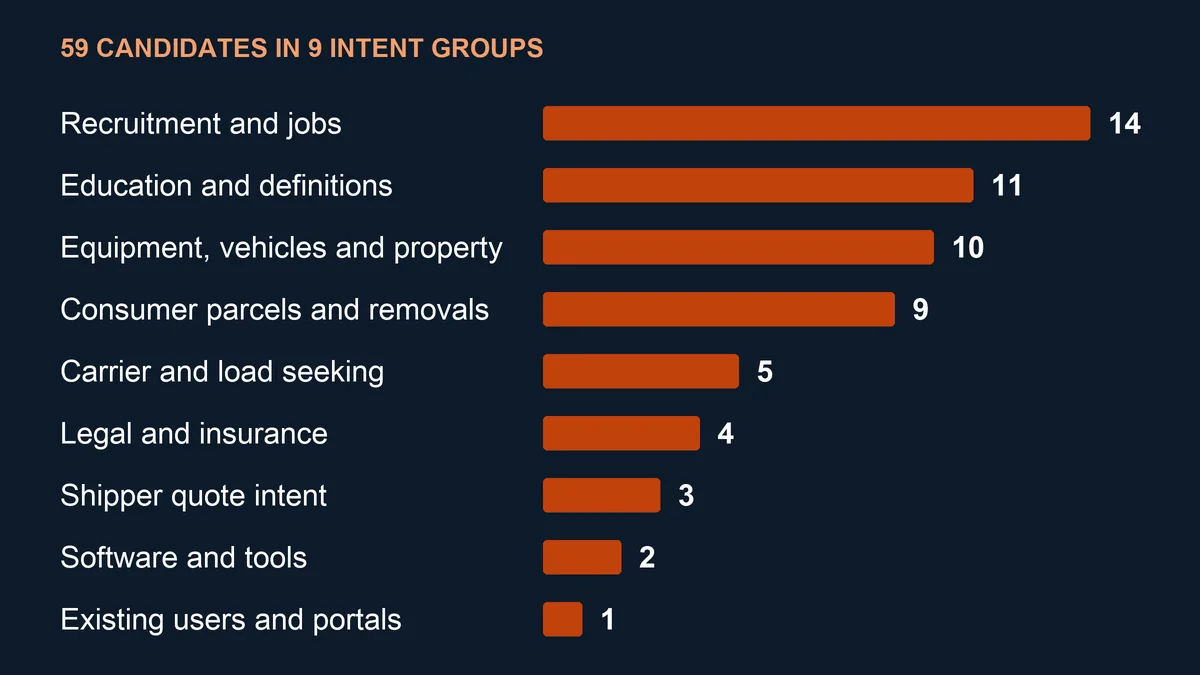
Logistics Google Ads negative keywords keep a freight quote campaign from paying for job seekers, parcel senders and students, yet the same words can be the whole point of a driver recruitment campaign. This library sorts 59 candidates by the campaign they suit, each with a match type, a reason and a condition for keeping it.
The match rules come from Google's own help pages, linked where they are used. Every file is a set of candidates to check against your search terms report, not a list to apply as it stands.
Updated October 20269 intent groups
Contents
Key takeaways
Negatives do not catch plurals or synonyms. Google's own example is a negative broad flowers that still lets red flower through, so this library lists vacancy and vacancies on separate lines. (Google Ads Help, About negative keywords)
Casing and misspellings are handled for you. Google states that negative keywords account for both, so the files carry no misspelt or capitalised variants. (Google Ads Help, About negative keywords)
Job terms belong in some campaigns and not others. A freight quote campaign usually excludes jobs and salary; the driver recruitment file contains neither, nor any other recruitment term. (Vektor Group)
An account level list reaches hiring campaigns too. Google applies account level negatives, up to 1,000 of them, to Search, Performance Max, App, Shopping, Smart and Local campaigns, so a recruitment term there also blocks your hiring ads. (Google Ads Help, account level negatives)
A shared list holds up to 5,000 negatives, and an account up to 20 lists. Google notes that these limits are subject to change, and that one list can be applied to up to 1,000 campaigns at a time. (Google Ads Help, negative keyword lists)
Free is not on the list. Searches such as free freight quote come from buyers, so the library leaves the word alone. (Vektor Group)
Display and Video read every negative as broad. Google says the match type cannot be changed there and excluded terms may still appear on some pages, so these files are written for Search. (Google Ads Help, Add negative keywords)
A negative that overlaps a keyword stops the ad. Google warns that overlap between negatives and regular keywords means the ad will not show, so compare each file with the campaign's keywords first. (Google Ads Help, Add negative keywords)
The search terms report comes first. Google's advice is to add a search term as a negative when it is not relevant enough to what you offer, and the report omits low volume terms for privacy. (Google Ads Help, search terms report)
Where to look first
Find the campaign you run and take the file made for it. Each file holds only the candidates for that campaign type, and every candidate still needs a check against your own search terms.
| Your question | Where to look |
|---|---|
| You advertise a haulier, broker or forwarder to shippers who send quote requests | The freight RFQ file, 50 candidates |
| You sell warehousing, fulfilment or 3PL contracts | The warehouse and 3PL file, 38 candidates |
| You are a broker or forwarder recruiting subcontracted carriers | The carrier sourcing file, 27 candidates; it leaves out the single word jobs, so owner operator job searches still reach you |
| You are hiring HGV, CDL or van drivers | The driver recruitment file, 16 candidates; it holds no job, salary or training terms |
| You want one exclusion list for the whole account | Only terms no campaign should ever show for, such as lawyer; Google applies account level negatives to Search, Performance Max, App, Shopping, Smart and Local campaigns alike |
| You want every candidate with its reasoning | The master file, 59 rows, under Downloads |
Negative keyword candidates by intent category
| Intent category | Who is searching | Candidates | Examples | Usually excluded in | Keep when |
|---|---|---|---|---|---|
| Recruitment and jobs | Drivers, warehouse staff and school leavers looking for work | 14 | jobs, vacancies, salary, hgv driver | Freight RFQ, warehouse and 3PL, carrier sourcing | Never excluded in a recruitment campaign |
| Consumer parcels and removals | Private senders, home movers and people tracking a parcel | 9 | parcel, tracking number, removals, man and van | Freight RFQ; some also in the other three | You sell parcels, removals or vehicle transport |
| Education and definitions | Students, trainees and readers looking up a term | 11 | course, training, definition, [logistics] | Freight RFQ, warehouse and 3PL; some in carrier sourcing | You sell training or run a content campaign |
| Equipment, vehicles and property | Buyers and renters of trucks, trailers, racking and storage | 10 | for sale, used trucks, van hire, self storage | All four campaign types, term by term | You sell or rent the equipment |
| Carrier and load seeking | Carriers and owner operators looking for loads | 5 | load board, find loads, return loads, owner operator | Freight RFQ, warehouse and 3PL; load terms also in driver recruitment | The campaign recruits carriers |
| Shipper quote intent | Shippers asking for a price | 3 | quote, quotes, freight rates | Carrier sourcing, driver recruitment | Any freight or warehouse sales campaign |
| Legal and insurance | People after lawyers, claims or truck insurance | 4 | accident, lawyer, attorney, truck insurance | All four campaign types | You sell repair, recovery or insurance |
| Existing users and portals | Customers of other firms trying to log in | 1 | login | All four campaign types | The campaign promotes your own portal |
| Software and tools | Software buyers and calculator users | 2 | software, cbm calculator | Freight RFQ; software also in warehouse and 3PL | You sell the software or offer the tool |
How negative match types behave
Negative keywords have their own match rules, and Google's help page on negative keywords sets out three types for Search campaigns. None of them matches close variants, so a plural, a synonym or a reworded search needs its own line.
Negative broad is the default: it blocks a search that contains every word of the negative, in any order. Negative phrase blocks the words in the same order with other words around them, and negative exact blocks only that search with nothing added.
The table applies those rules to one logistics negative, driver jobs. The rows follow Google's published rules; they are not account data.
| Search | Negative broad: driver jobs | Negative phrase: "driver jobs" | Negative exact: [driver jobs] |
|---|---|---|---|
| driver jobs | Blocked | Blocked | Blocked |
| hgv driver jobs leeds | Blocked | Blocked | Can show |
| jobs for a driver | Blocked | Can show | Can show |
| driver job | Can show | Can show | Can show |
| delivery driver vacancies | Can show | Can show | Can show |
Which file fits which campaign
Each import file is cut from the master list for one campaign type. Terms that a campaign exists to reach stay out of its file, which is why the four files differ in length.
| File | Campaign it is for | Candidates | Never contains |
|---|---|---|---|
| Freight RFQ | Hauliers, brokers and forwarders asking shippers for quote requests | 50 | quote, quotes, freight rates |
| Warehouse and 3PL | Warehousing, fulfilment and 3PL contract sales | 38 | quote, quotes, parcel, parcels |
| Carrier sourcing | Brokers and forwarders recruiting subcontracted carriers | 27 | jobs, load board, find loads, return loads, owner operator, truck dispatcher, freight rates |
| Driver recruitment | Carriers hiring HGV, CDL or van drivers | 16 | Any recruitment or education term, and owner operator |
How to load a file into Google Ads Editor
Each campaign file has two columns, Keyword and Match type, with the English headers that Google Ads Editor's CSV column guide lists. The match types are written as negative broad, negative phrase or negative exact, the explicit format in Editor's guide to keyword match types.
In Editor, select Keywords and Targeting, then Keywords, Negative, and click Make multiple changes. Choose Use selected destinations and Add as campaign-level negative keywords, select the campaign, paste the rows and click Process; Google's Editor help on negative keywords lists the same steps.
Editor then shows the rows as pending changes, which you keep or reject. It cannot add campaign and ad group negatives in the same pass, so every file here is written for campaign level.
To build a shared list in the Google Ads web interface instead, paste one term per line and mark the match type with Google's symbols: quotes for phrase, square brackets for exact, nothing for broad. Then apply the list only to the campaigns it suits.
What to check before adding a candidate
Start with the campaign's search terms report. Google's advice is to add a search term as a negative when it is not relevant enough to what you offer, and the report omits low volume terms for privacy, so some searches never appear in it.
Then compare each file with the campaign's own keywords. Google warns that a negative overlapping a regular keyword stops the ad showing: a broad negative parcel would block a keyword such as parcel and pallet delivery.
Read each keep if condition against what you sell. A haulier that moves forklifts, a 3PL that sells parcel fulfilment or a carrier that leases owner operators keeps terms the files exclude.
The candidates are English, and a negative only blocks the words it contains, so a campaign in German, Dutch or Polish needs its own terms. If quote requests are the conversion, the freight RFQ metrics guide sets out how to count them from enquiry to booking.
Symbols, spelling and long searches
Google treats some characters in negatives in particular ways. The examples apply those rules to logistics wording.
| Case | What Google does | Logistics example |
|---|---|---|
| Ampersand | Treated as different from the word and | pick & pack and pick and pack are two negatives |
| Accent marks | An accented and an unaccented form are two negatives | zürich and zurich need a line each |
| Full stops | Ignored | st. helens and st helens are the same negative |
| Invalid symbols | Rejected with an error; the comma, ! @ % ^ ( ) = ; ? and | are among them | None of the 59 candidates uses one |
| Minus sign inside a negative | The word after it is ignored | warehouse -jobs would act as warehouse alone and block every warehouse search |
| Capitals and misspellings | Handled automatically | No separate lines for Jobs or vacancys |
| Searches longer than 16 words | A negative that comes after the 16th word may not stop the ad | Applies to every term in these files |
Where a negative applies, and the limits
The level you choose decides how many campaigns a term reaches. Recruitment terms are safest at campaign level, or in a shared list applied only to sales campaigns.
| Level | What it reaches | Limit Google states | Use it for |
|---|---|---|---|
| Account level | Search and shopping inventory in Search, Performance Max, App, Shopping, Smart and Local campaigns | 1,000 negatives per account | Terms no campaign should show for, such as lawyer or attorney |
| Shared negative keyword list | The campaigns you apply it to | 20 lists per account, 5,000 negatives per list; one list applied to up to 1,000 campaigns at a time | One list per campaign type, matching the files here |
| Campaign | One campaign | Not published | Exclusions that only that campaign needs |
| Performance Max campaign | Search and Shopping inventory only | Not published | Terms added in the web interface; account level negatives apply as well |
| Display and Video | Sites and videos, with every negative read as broad | Google Ads Help: 1,000 per account considered; Google Ads Editor Help: 5,000 per ad | Little; Google points to site category options and content exclusions instead |
Terms the library leaves out on purpose
Some words look like obvious negatives and are not. Free appears in buyer searches such as free freight quote, cheap in searches such as cheap pallet delivery, and hire in searches such as hire a haulier.
Single words with a second meaning are written as phrases instead. Used would block used cooking oil collection, degree would block minus 20 degree transport and insurance would block cargo insurance, so the library excludes used trucks, logistics degree and truck insurance.
Job in the singular is left out too, because it can describe a single load, as in a quote for a haulage job. Only the plural jobs is excluded as a word on its own, and only in the freight RFQ and warehouse files.
Negative keyword review sheet
Fill in one sheet per campaign before a file goes into Editor. Anyone who reviews the account later can see why each term was added and when to look at it again.
| Field | What to write | Your answer |
|---|---|---|
| Campaign and goal | Campaign name, campaign type and the conversion it is judged on, such as quote requests or driver applications | |
| Other campaigns in the account | Any recruitment, carrier or brand campaign that a shared or account level list would also reach | |
| Search terms period | Dates of the search terms report reviewed and how many search terms it held | |
| Candidate term | The term from the master file, exactly as it will be added | |
| Searches it would block | Search terms in the report that contain it, and any of them that converted | |
| Keyword overlap | Keywords in the campaign that the negative would stop, and how the conflict is resolved | |
| Match type and variants | Broad, phrase or exact, with singular, plural and synonym lines added where buyers use them | |
| Level | Account, shared list, campaign or ad group | |
| Keep if condition | Whether it applies to this business, and the evidence | |
| Decision and reviewer | Added, kept or rejected, by whom and on which date | |
| Recheck date | When the search terms report will be read again for this term |
Talk to us about your plan
Tell us the lanes, customers or partners you want more of. Our in-house team reads every enquiry and replies by email; there is no call booked unless you ask for one.
Send a marketing enquiryCommon questions
Can I apply these files without changes?
No. They are candidates sorted by campaign type; check each one against your search terms report, your own keywords and its keep if condition before it goes into an account.
Why does the driver recruitment file have no job terms?
Because people searching for jobs, salaries and training are the audience of a hiring campaign. Its 16 candidates are terms such as tracking number, quote and load board, which bring the wrong people to a job advert.
Should negatives go in an account level list?
Only terms no campaign should ever show for. Google applies account level negatives to Search, Performance Max, App, Shopping, Smart and Local campaigns, up to 1,000 terms, so a recruitment term there would also block your hiring ads.
Do I need to add misspellings and plurals?
Plurals and synonyms yes, misspellings and capitals no. Google states that negatives do not match close variants but do account for casing and misspellings.
Do the files work for Performance Max?
The terms do, through the Google Ads web interface. Google lets advertisers add negatives to a Performance Max campaign for Search and Shopping inventory only; the Editor steps on this page are written for Search campaigns.
Which match type should a new negative use?
Phrase for a term of several words whose order matters, such as used trucks; broad for a single word with one meaning, such as salary; exact for a bare search such as logistics, where longer searches with the same word come from buyers. The master file gives a suggestion and the reason for each term.
How many negatives can a list hold?
Google states 5,000 per shared list and 20 lists per account, and notes that the limits are subject to change. The freight RFQ file holds 50.
Can I use Google's bulk upload spreadsheet instead?
Google publishes a template for adding negatives to lists through bulk uploads on its bulk upload templates page. The files here follow the Google Ads Editor format, so use the template's own columns if you take that route.
Summary
Take the file for the campaign you run: freight RFQ (50 candidates), warehouse and 3PL (38), carrier sourcing (27) or driver recruitment (16). Read each term against your search terms report, your own keywords and its keep if condition, add plurals where buyers use them, and keep recruitment terms out of any list that reaches a hiring campaign. To hand the work to an agency instead, our logistics Google Ads agency comparison sets out who offers it.
Sources
Downloads
More buyer's guides
About Vektor Group marketing
Vektor Group runs SEO, Google Ads and email marketing for logistics businesses, from an in-house team that also brokers road freight in Europe, so the buyer questions on these pages are ones we answer for our own loads.
Rene Siller is responsible for the content. Results an agency reports are its own figures. Each guide is reviewed every quarter; corrections go to info@vektorgroup.eu.
No agency paid to be listed and no link carries an affiliate code.
Cite this comparison
Vektor Group. Logistics Google Ads Negative Keywords: Candidates by Campaign Type. Vektor Group, 8 October 2026. https://vektorgroup.eu/marketing/resources/logistics-google-ads-negative-keywords